

custom_sum_values, a tool that sums numbers supplied in its arguments. It reads no external data.
You need Vantage, Forge authoring, a permitted workspace agent and the deployment’s confined runtime. User-authored tools support workspace agents. Plain Arc chats, Kato and workflow tool contexts have separate execution paths.
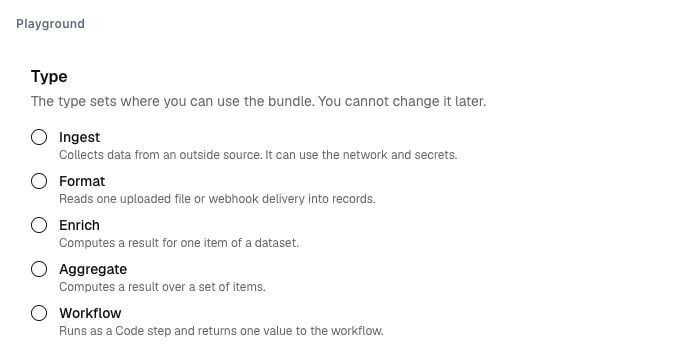
Illustrative current bundle controls. Choose Ingest for collection or Agent tool for a tool implementation. The type is fixed at creation.
1
Create the Agent tool bundle
Open Forge → Bundles and choose Agent tool. Add Set runtime
main.ts:2026.10 and entrypoint main.ts. No external package is required.2
Declare inputs, result and limits
Use this Parameters schema:Use this Result schema:Set bounded wall time, CPU, memory, output and temporary storage. Declare no record outputs, network, secrets or checkpoint.
3
Publish the implementation
Publish the bundle and inspect its version and content digest. These identify the implementation that the tool runs.A Tool bundle returns one result through
ctx.result. A call returning no result fails.4
Create the tool descriptor
Open Forge → Tools and create
custom_sum_values for the agent surface.Select the published bundle version. Confirm that the copied input/result schemas and implementation digest match that version. Retain the confined-runtime requirement.Keep scope Private for your test, or use an authorised workspace scope. Deployment-wide authored tools are refused. Publish the descriptor.5
Test through a workspace agent
Add the published tool to a permitted agent definition. Publish the definition for your test workspace and start an Explorer session.Ask the agent to call
custom_sum_values with values from your own small numeric check. Compare the returned total with a manual calculation.Check an empty list and an invalid argument. Inspect the call’s tool version and implementation binding. A missing confined runtime must leave the tool unavailable.