Kato helps you operate Cortex through conversation. The request tells it what you want, the open page can identify where you are, and resource permissions determine which operations it may perform.
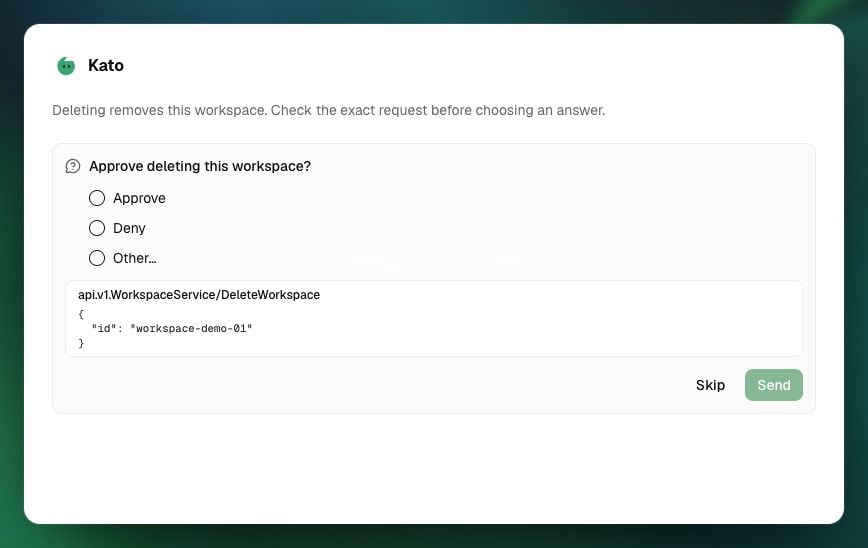
Kato approval request mockup.

Illustrative Kato approval: check the server request, choose an answer and send it. Demo resource identifier shown.

Your request identifies the intended work

When you ask from an open page, Kato can receive its path and resource identifiers. That helps resolve a request such as “open this workspace’s dataset”. The page context does not automatically provide the workspace’s complete contents, prove that all evidence is ready or supply missing authority. Name the target when a task concerns another resource. For a workspace task, identify the workspace and your permitted dataset. For an Arc task, identify the intended chat or project. For a definition or run, supply the relevant version or identifier. Restate the target in a follow-up when ambiguity would matter. Kato is not confined to the workspace currently open. It can operate across resources you can reach. Moving to another page does not merge their context or permissions.

Kato, Arc and Explorer have different jobs

A Kato setup proposal is a proposal about resources and operations. The investigation’s findings need support from the evidence actually available to Explorer. A collection plan does not make its candidate sources connected, complete or permitted to collect. Arc and Vantage have independent documentation routes. Use the route for the product and resources you can access. Each resource retains its context and permissions; What carries over explains continuity.

Your authority follows the operation

Kato acts with your normal authority. Product access, resource grants, clearance, source credentials, model/provider constraints and execution requirements still apply. General help is available without a Vantage gate; workspace creation or workflow execution still needs the relevant access. Finding an item, opening it and changing it are distinct operations. Permission to read a dataset does not give Kato permission to ingest into it. A declared secret must be set under its central name before the job can run. A visible destination does not grant every permission inside it. An ordinary creation/update request can authorise the content change without a separate approval card. Gated operations, including deletion, access changes and decisions, ask for approval for the named action. Kato cannot manage passwords, sessions, MFA or API keys. Enter secrets through their secure interface and provide authorised references for use. See What Kato can do for the operation boundaries. Manage workspace members and security level owns workspace membership and clearance rules.

Setup, processing and publication are separate choices

In a setup conversation, agreeing the proposal identifies the resources and changes you want. That agreement does not silently authorise additional collection, automatic processing or publication. State those choices separately, with their scope and limits. A Kato approval card authorises a gated action. A review decision assesses an exact subject version and records its outcome. Publishing a reusable definition makes that version available for permitted use. Publishing an artefact makes an output version available through its publication path. These decisions serve different purposes. In the document-review workflow lesson, the author deliberately connects only the approval exit to Publish. Other workflows can have a different configured publication path; review is not supplied automatically by Kato assistance. How workflow runs retain evidence and decisions explains the record.

A conversation can finish before the work does

After Kato submits collection, evaluation or a workflow, the platform tracks that work separately. You can inspect a resource while its processing continues. A successful reply does not establish completion; a failed or interrupted reply does not establish cancellation or rollback. Use the returned resource and run identifiers to track the work. Inspect completed changes before a retry, and resume only the remaining task. This keeps the result you verify tied to the operation you intended.

Keep important Kato work identifiable

Starting a new Kato conversation can soft-delete older unstarred conversations. Starred conversations and the ten newest others are retained. Keep resource and run identifiers with important work; submitted resources have their own lifecycle.