> ## Documentation Index
> Fetch the complete documentation index at: https://docs.cortex-labs.ai/llms.txt
> Use this file to discover all available pages before exploring further.
# Investigate with map, graph, time, and areas
> Use linked views and explicit time windows while checking placement, uncertainty and loaded coverage.
You need access to the workspace's world model and underlying evidence. Use a question that can be checked against your own data.
 ## Choose and inspect a view
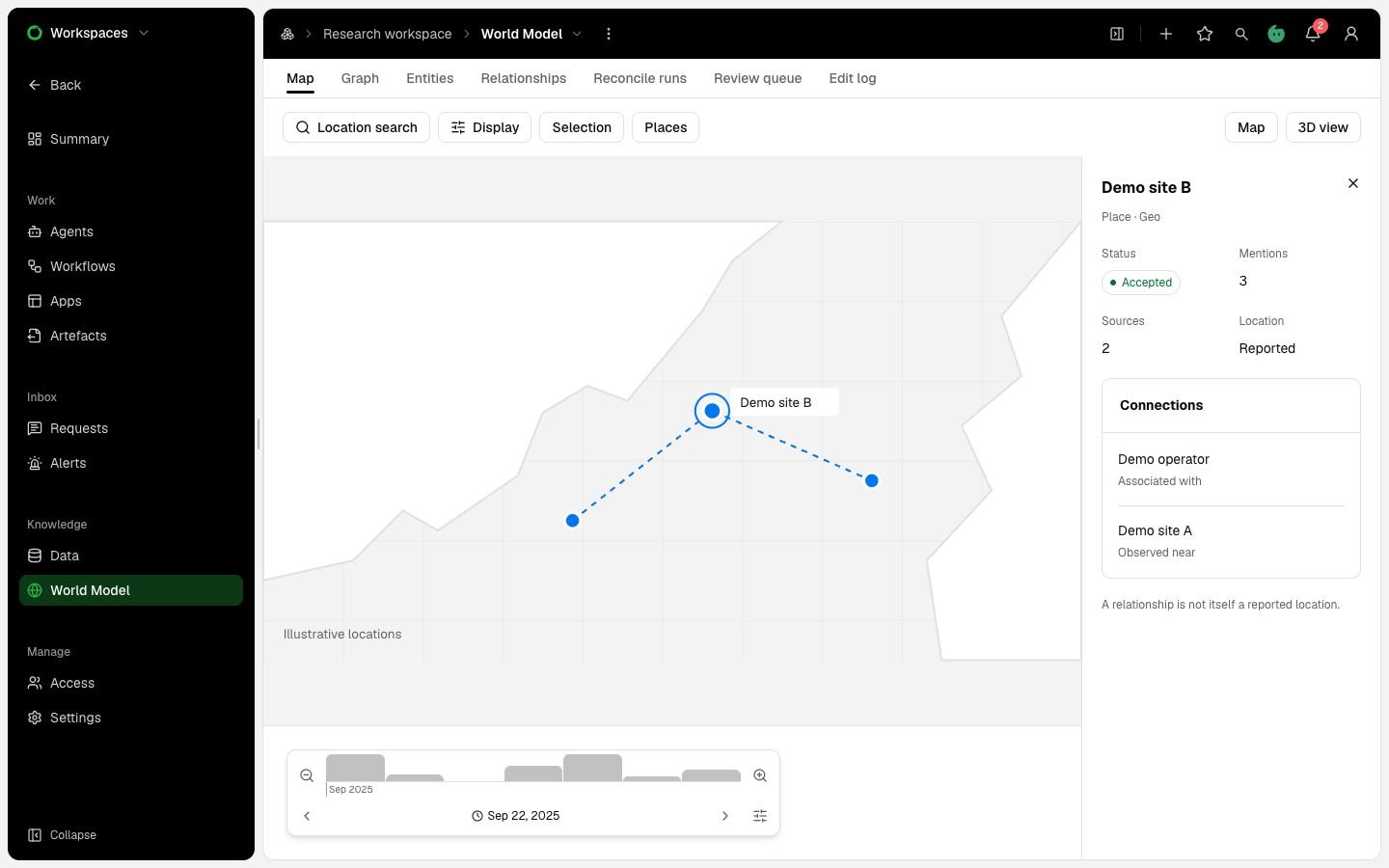
Open **World Model → Map** or **Graph**. Use **Select** to inspect an entity. Use **Pan** to move the view; press Escape to return to Select.
In the graph, use **Path** for the shortest route between two selected entities. Use **Neighbours** for one entity and its direct links. Open evidence before interpreting a highlighted connection.
The side pane's **Display** tab controls layers, counts and layout. **Selection** holds the inspected items. The map's **Places** tab contains areas, planning shapes and unplaced entities.
Check scene limits and loaded coverage. The graph defaults to 2,500 entities and permits a limit from 1,000 to 10,000. The map reads up to 20,000 positions. A partial scene cannot establish absence.
## Distinguish location from association
The map uses readable position evidence first. Other supported placement includes a manual pin, a reported location relationship or an approved gazetteer match.
**Show associated entities** starts off. When enabled, it can draw an unpositioned entity beside a related anchor. Inspect the association label and supporting relationships. That display establishes neither a location nor area membership.
Leave unresolved places in **Unplaced**. Do not supply invented coordinates to complete a scene.
## Select the time question
Show the time bar and choose **Event time** or **Collected time**. Use an absolute range when the task needs reproducible bounds. The time bar displays UTC.
Click a bar to select its unit, or drag across bars. Use zoom and step controls to inspect adjacent periods. Browser Back returns to earlier window selections.
Event-time overlap includes uncertain dates at their stated precision. Check mentions with undecided time separately.
On the map and graph, the reported-by rule can hide sources published after the event window. It does not apply to tables, area members, time-bar counts or density. Do not interpret those counts as identical filtered populations.
Collected time and event time both show the current lists. Neither reconstructs earlier curation state.
## Inspect an area
Select a saved area in **Places**, or use permitted drawing controls. Check its revision, geometry and selected event time. Area queries need a qualifying event window of at most 31 days.
Read **inside**, **partial** and **unknown** separately. Inspect unknown reasons such as conflicting mentions, uncertain boundaries or missing usable event time. Association placement supplies no area evidence.
| Layer or shape | Meaning |
| - | - |
| World-model layer | Types and entries from the pinned schema. |
| Analysis layer | A saved density specification or geometry set with evidence. |
| Planning annotation | A person's current planning shape. It is separate from extracted evidence. |
Map packs supply retained basemap, terrain and gazetteer assets inside the deployment. Missing geography does not trigger an external fallback. Use the graph or tables when required map data is unavailable.
Finish with a note naming the view, time axis, interval, filters, coverage and evidence behind your conclusion. See [Follow a finding to its evidence](/vantage/explore-evidence/follow-evidence).
This documentation is built and hosted on [Mintlify](https://mintlify.com), a developer documentation platform.
## Choose and inspect a view
Open **World Model → Map** or **Graph**. Use **Select** to inspect an entity. Use **Pan** to move the view; press Escape to return to Select.
In the graph, use **Path** for the shortest route between two selected entities. Use **Neighbours** for one entity and its direct links. Open evidence before interpreting a highlighted connection.
The side pane's **Display** tab controls layers, counts and layout. **Selection** holds the inspected items. The map's **Places** tab contains areas, planning shapes and unplaced entities.
Check scene limits and loaded coverage. The graph defaults to 2,500 entities and permits a limit from 1,000 to 10,000. The map reads up to 20,000 positions. A partial scene cannot establish absence.
## Distinguish location from association
The map uses readable position evidence first. Other supported placement includes a manual pin, a reported location relationship or an approved gazetteer match.
**Show associated entities** starts off. When enabled, it can draw an unpositioned entity beside a related anchor. Inspect the association label and supporting relationships. That display establishes neither a location nor area membership.
Leave unresolved places in **Unplaced**. Do not supply invented coordinates to complete a scene.
## Select the time question
Show the time bar and choose **Event time** or **Collected time**. Use an absolute range when the task needs reproducible bounds. The time bar displays UTC.
Click a bar to select its unit, or drag across bars. Use zoom and step controls to inspect adjacent periods. Browser Back returns to earlier window selections.
Event-time overlap includes uncertain dates at their stated precision. Check mentions with undecided time separately.
On the map and graph, the reported-by rule can hide sources published after the event window. It does not apply to tables, area members, time-bar counts or density. Do not interpret those counts as identical filtered populations.
Collected time and event time both show the current lists. Neither reconstructs earlier curation state.
## Inspect an area
Select a saved area in **Places**, or use permitted drawing controls. Check its revision, geometry and selected event time. Area queries need a qualifying event window of at most 31 days.
Read **inside**, **partial** and **unknown** separately. Inspect unknown reasons such as conflicting mentions, uncertain boundaries or missing usable event time. Association placement supplies no area evidence.
| Layer or shape | Meaning |
| - | - |
| World-model layer | Types and entries from the pinned schema. |
| Analysis layer | A saved density specification or geometry set with evidence. |
| Planning annotation | A person's current planning shape. It is separate from extracted evidence. |
Map packs supply retained basemap, terrain and gazetteer assets inside the deployment. Missing geography does not trigger an external fallback. Use the graph or tables when required map data is unavailable.
Finish with a note naming the view, time axis, interval, filters, coverage and evidence behind your conclusion. See [Follow a finding to its evidence](/vantage/explore-evidence/follow-evidence).
This documentation is built and hosted on [Mintlify](https://mintlify.com), a developer documentation platform.