> ## Documentation Index
> Fetch the complete documentation index at: https://docs.cortex-labs.ai/llms.txt
> Use this file to discover all available pages before exploring further.
# Investigate in Explorer
> Ask a question of your own workspace data, check the evidence and save a scoped note.
Investigate your own workspace evidence with Explorer. You will check the inputs, ask a focused question, inspect a material claim and save a short investigation note.
If you used [Kato to prepare the workspace](/kato/prepare-workspace), start with the setup you inspected. Kato operates resources; Explorer investigates the permitted evidence inside the workspace.
 ## Before you begin
You need Vantage access, workspace and relevant dataset access, permission to submit instructions and save content, and an eligible published agent definition. Select a workspace containing a small dataset relevant to a question you want to answer. It must reach the workspace through a collection.
Choose inputs you can inspect yourself. Note the dataset and collection identifiers, contents, processing state and known gaps. If time matters, choose exact start/end dates and a time zone that match the available evidence; omit the period for a timeless question. Replace bracketed prompt fields before sending.
If the starting workspace or data is missing, use [Kato-assisted setup](/kato/prepare-workspace) or the direct [workspace lesson](/vantage/set-up-a-workspace/create-workspace). Complete the necessary data preparation before treating the workspace as ready to investigate.
Read the workspace **Summary**. Confirm your question and scope. Inspect the selected collection, attached datasets, coverage and processing state.
Separate available, incomplete and inaccessible input. Missing access or unfinished processing cannot establish that no event occurred. Direct source investigation needs no world-model graph.
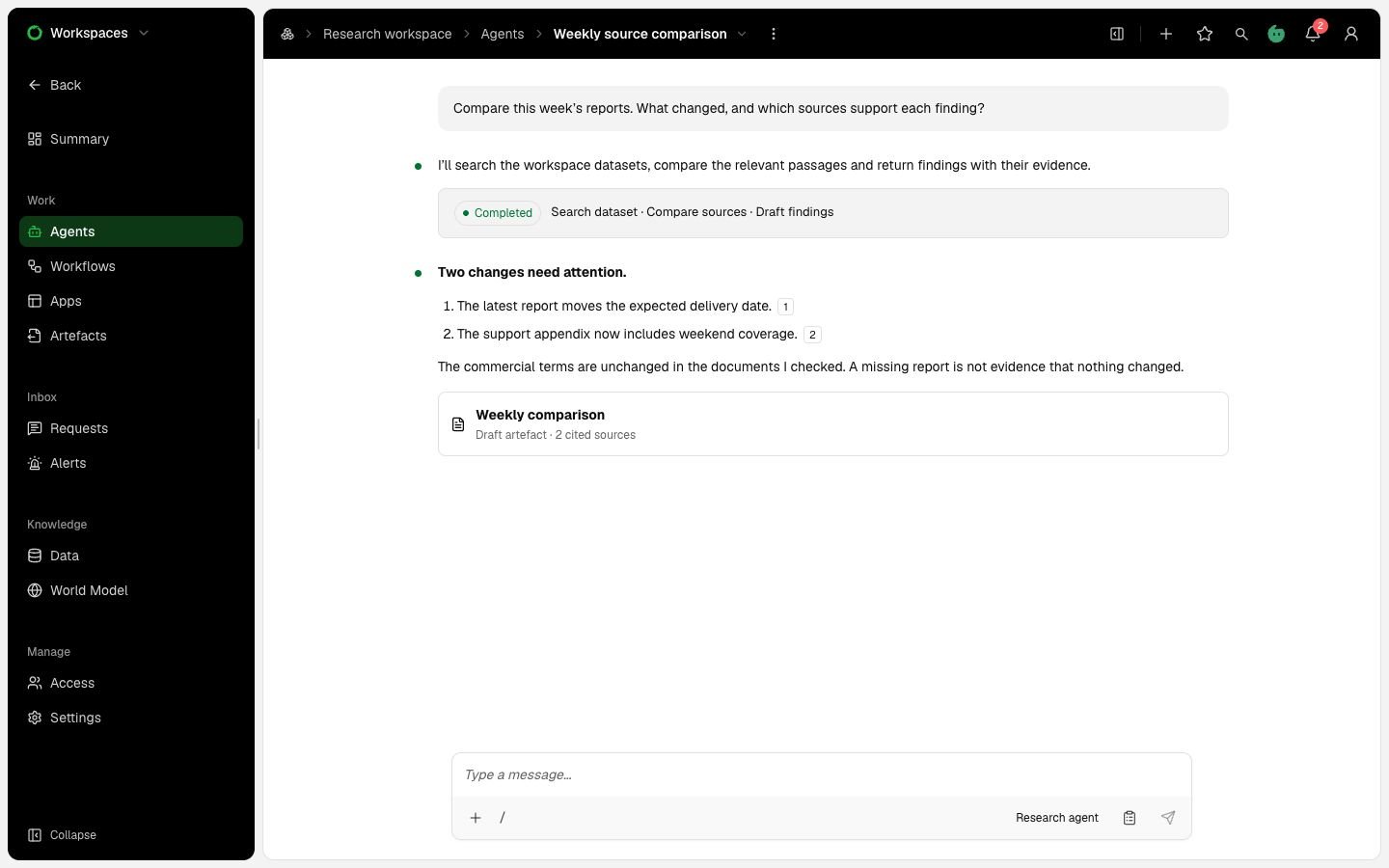
Open **Agents**, start an agent chat and select a permitted agent definition with suitable instructions, tools and model. This is the Explorer investigation route. Do not choose Simple chat for dataset investigation. Send:
> Orient me to \[workspace name] and \[collection or dataset]. My question is \[question], within \[scope and optional exact period]. Summarise available evidence, coverage, processing gaps and tools. Inspect only at this stage; leave collection, processing and workspace content unchanged.
Compare the answer with your dataset inspection. Resolve an unexpected input or scope before continuing.
The agent acts with the submitting user's authority. Sharing a chat does not combine permissions. Owners manage workspace standing instructions; a chat request does not edit the reusable agent definition.
Send:
> Answer \[focused question] using the permitted inputs and scope we identified. Separate source statements from inferences. Cite the exact source version and relevant passage or locator for each material claim. Keep conflicting accounts and missing information explicit.
Check scope and support. Your data may support a finding, a qualified answer or a conclusion that the question cannot yet be answered. No fixed result is expected.
Open one material claim's citation. Read the cited content and surrounding context. Confirm its source version and distinguish event time from publication time where relevant.
Use [Follow a finding to its evidence](/vantage/explore-evidence/follow-evidence) for the checks. If no claim is supported, inspect the reported coverage limitation. Ask Explorer to correct an overstatement, compare accounts or narrow the question. Unsupported explanations remain hypotheses.
When you have checked the support, send:
> Save a workspace artefact named \[note title]. Include our question and scope, the findings we checked with exact evidence references, conflicting claims, hypotheses and coverage or processing gaps. Leave it as a draft for inspection.
Saving needs **Build** mode. If a Plan handoff is pending, [review and decide it](/vantage/explore-evidence/review-plan) before implementation.
Open the saved version and check content, assets, evidence and limitations. Files produced during a turn belong to the artefact only when included in an explicit save.
Use the stop control if execution remains active. Committed messages and saved outputs remain; identify unfinished work before leaving.
Reopen the investigation and note. Before a later turn, check current access, coverage and the definition version used. A new published definition can affect the next turn without rewriting earlier messages or evidence.
## Check the result
You should be able to state your question, trace a material finding to its source or explain why none is supported, and reopen the saved note. Keep supported claims, hypotheses and missing inputs distinct.
Saving does not approve or publish an artefact. When a human decision is required, submit the selected version for workspace review and inspect the review item. Publication requires approval of that exact output; a revised version needs fresh approval.
[What carries over](/getting-started/what-carries-over) explains retained work and access boundaries. [Review and decide an Explorer plan](/vantage/explore-evidence/review-plan) covers deciding an approach before implementation.
## Share the investigation or its output
An agent chat starts private to its owner. Only its owner changes the audience. A collaborator needs the appropriate workspace access and Vantage capability. Sharing the chat does not combine execution authority.
A chat artefact starts **Private**. Its owner can set it to **Workspace** so workspace members can read and export it without reading the source chat. That visibility grants no edit authority or source-dataset access. The workspace **Artefacts** page lists Workspace artefacts and your own Private artefacts.
For publication, use [Request a review](/vantage/review-and-publish/request-review) and [Publish or withdraw an approved artefact](/vantage/review-and-publish/publish-withdraw).
This documentation is built and hosted on [Mintlify](https://mintlify.com), a developer documentation platform.
## Before you begin
You need Vantage access, workspace and relevant dataset access, permission to submit instructions and save content, and an eligible published agent definition. Select a workspace containing a small dataset relevant to a question you want to answer. It must reach the workspace through a collection.
Choose inputs you can inspect yourself. Note the dataset and collection identifiers, contents, processing state and known gaps. If time matters, choose exact start/end dates and a time zone that match the available evidence; omit the period for a timeless question. Replace bracketed prompt fields before sending.
If the starting workspace or data is missing, use [Kato-assisted setup](/kato/prepare-workspace) or the direct [workspace lesson](/vantage/set-up-a-workspace/create-workspace). Complete the necessary data preparation before treating the workspace as ready to investigate.
Read the workspace **Summary**. Confirm your question and scope. Inspect the selected collection, attached datasets, coverage and processing state.
Separate available, incomplete and inaccessible input. Missing access or unfinished processing cannot establish that no event occurred. Direct source investigation needs no world-model graph.
Open **Agents**, start an agent chat and select a permitted agent definition with suitable instructions, tools and model. This is the Explorer investigation route. Do not choose Simple chat for dataset investigation. Send:
> Orient me to \[workspace name] and \[collection or dataset]. My question is \[question], within \[scope and optional exact period]. Summarise available evidence, coverage, processing gaps and tools. Inspect only at this stage; leave collection, processing and workspace content unchanged.
Compare the answer with your dataset inspection. Resolve an unexpected input or scope before continuing.
The agent acts with the submitting user's authority. Sharing a chat does not combine permissions. Owners manage workspace standing instructions; a chat request does not edit the reusable agent definition.
Send:
> Answer \[focused question] using the permitted inputs and scope we identified. Separate source statements from inferences. Cite the exact source version and relevant passage or locator for each material claim. Keep conflicting accounts and missing information explicit.
Check scope and support. Your data may support a finding, a qualified answer or a conclusion that the question cannot yet be answered. No fixed result is expected.
Open one material claim's citation. Read the cited content and surrounding context. Confirm its source version and distinguish event time from publication time where relevant.
Use [Follow a finding to its evidence](/vantage/explore-evidence/follow-evidence) for the checks. If no claim is supported, inspect the reported coverage limitation. Ask Explorer to correct an overstatement, compare accounts or narrow the question. Unsupported explanations remain hypotheses.
When you have checked the support, send:
> Save a workspace artefact named \[note title]. Include our question and scope, the findings we checked with exact evidence references, conflicting claims, hypotheses and coverage or processing gaps. Leave it as a draft for inspection.
Saving needs **Build** mode. If a Plan handoff is pending, [review and decide it](/vantage/explore-evidence/review-plan) before implementation.
Open the saved version and check content, assets, evidence and limitations. Files produced during a turn belong to the artefact only when included in an explicit save.
Use the stop control if execution remains active. Committed messages and saved outputs remain; identify unfinished work before leaving.
Reopen the investigation and note. Before a later turn, check current access, coverage and the definition version used. A new published definition can affect the next turn without rewriting earlier messages or evidence.
## Check the result
You should be able to state your question, trace a material finding to its source or explain why none is supported, and reopen the saved note. Keep supported claims, hypotheses and missing inputs distinct.
Saving does not approve or publish an artefact. When a human decision is required, submit the selected version for workspace review and inspect the review item. Publication requires approval of that exact output; a revised version needs fresh approval.
[What carries over](/getting-started/what-carries-over) explains retained work and access boundaries. [Review and decide an Explorer plan](/vantage/explore-evidence/review-plan) covers deciding an approach before implementation.
## Share the investigation or its output
An agent chat starts private to its owner. Only its owner changes the audience. A collaborator needs the appropriate workspace access and Vantage capability. Sharing the chat does not combine execution authority.
A chat artefact starts **Private**. Its owner can set it to **Workspace** so workspace members can read and export it without reading the source chat. That visibility grants no edit authority or source-dataset access. The workspace **Artefacts** page lists Workspace artefacts and your own Private artefacts.
For publication, use [Request a review](/vantage/review-and-publish/request-review) and [Publish or withdraw an approved artefact](/vantage/review-and-publish/publish-withdraw).
This documentation is built and hosted on [Mintlify](https://mintlify.com), a developer documentation platform.