> ## Documentation Index
> Fetch the complete documentation index at: https://docs.cortex-labs.ai/llms.txt
> Use this file to discover all available pages before exploring further.
# Follow a finding to its evidence
> Check a claim against its exact source version, inspect conflicting evidence and record material gaps.
Use this procedure before relying on a finding from Explorer, a workspace artefact or the world model. Start with a specific claim and its evidence references. You need current access and clearance for the workspace, the source and any supporting assets.
For a guided investigation using your own data, begin with [Investigate in Explorer](/vantage/explore-evidence/investigate).
Write down what the finding asserts: the subject, action or relationship, place and time. Separate a source's report from an agent's inference.
For your task, check the strength of the claim against what the source actually states. A report that an event occurred does not by itself establish its cause or intent.
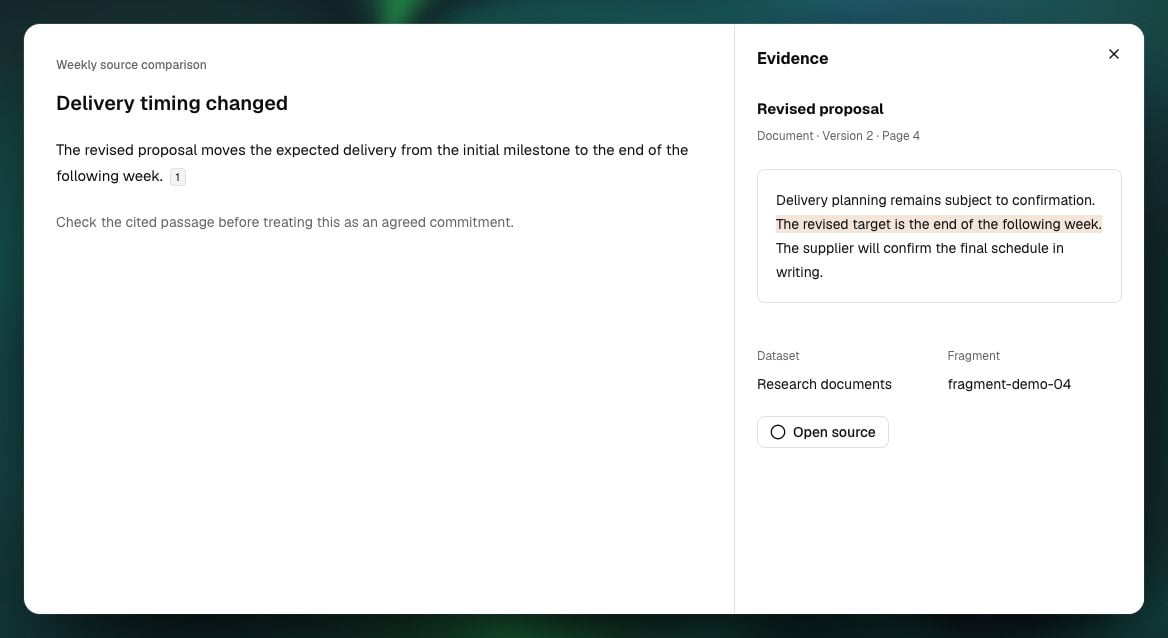
Select the citation or evidence reference. Check the source identity, cited content version and locator, then inspect the passage, record, frame, observation or geometry it identifies. Read enough surrounding content to check qualifications and context.
A citation addresses one exact version. If a newer version exists, inspect it separately; it does not replace the evidence behind the earlier finding. Record a correction as a change to the assessment with its own evidence.
Check event time against publication or collection time. Missing time remains unknown. A document's publication date alone does not date the event it describes.
For an entity, relationship or attribute, open its supporting mentions and citations. Follow the evidence through the producing enrichment result to the exact source fragment version.
Check whether the value was reported by the source or inferred during extraction. Inspect processing coverage and outcome: no extracted mentions, unsupported input, partial processing and failure have different meanings.
Entity status, mention counts and confidence scores do not establish that a claim is true. Two analyses of one item count as one observation. Multiple sources may share an origin; counts alone do not prove independent corroboration. Keep conflicting attribute values visible until the evidence resolves them.
Inspect contrary accounts within the same scope and period. Compare what each source actually says, which versions were used and whether the accounts describe the same event.
Ask Explorer to distinguish direct support, inference and unresolved conflict. Verify its answer against the cited inputs. An explanation without enough support remains a hypothesis; an inaccessible source does not become evidence against it.
Check the workspace's collection coverage and processing state. Missing access, an excluded dataset, unfinished processing or an unsupported input can limit the finding. An empty search result alone does not establish that no event occurred.
If a reference cannot open, record the source/version identity and the reason shown. Distinguish lost access from removed or expired content. Ask an authorised owner to resolve an access issue; do not substitute another version silently.
A citation alone takes no retention hold. Temporary stream inputs can expire. A retained output requires preservation of its complete effective input set before expiry; visible citations may show only a subset of what the operation consumed.
Treat a finding whose material support cannot be inspected as limited. Do not describe it as verified until the necessary evidence is available and checked.
Update the investigation or save a new artefact version with the checked claim, exact evidence references, relevant dates, conflicting accounts and material limitations.
Confirm that another authorised reader can open the cited versions and required assets. Creating a revised version preserves the earlier record and requires fresh review if the revised output is to be published.
 ## Check the result
For each material claim, you should be able to identify what supports it, which source versions were used and what remains uncertain. Keep an unsupported claim as a hypothesis, qualify a partial claim and record inaccessible evidence explicitly.
Return to [Investigate in Explorer](/vantage/explore-evidence/investigate) to refine the question or save the checked output. [What carries over](/getting-started/what-carries-over) explains the boundaries between retained work, current access and later tasks.
Use [Mentions, entities and relationships](/vantage/explore-evidence/mentions-entities-relationships) for interpretation boundaries and [Streaming data and retention](/vantage/bring-in-data/streaming-and-retention) for expiring sources.
This documentation is built and hosted on [Mintlify](https://mintlify.com), a developer documentation platform.
## Check the result
For each material claim, you should be able to identify what supports it, which source versions were used and what remains uncertain. Keep an unsupported claim as a hypothesis, qualify a partial claim and record inaccessible evidence explicitly.
Return to [Investigate in Explorer](/vantage/explore-evidence/investigate) to refine the question or save the checked output. [What carries over](/getting-started/what-carries-over) explains the boundaries between retained work, current access and later tasks.
Use [Mentions, entities and relationships](/vantage/explore-evidence/mentions-entities-relationships) for interpretation boundaries and [Streaming data and retention](/vantage/bring-in-data/streaming-and-retention) for expiring sources.
This documentation is built and hosted on [Mintlify](https://mintlify.com), a developer documentation platform.