> ## Documentation Index
> Fetch the complete documentation index at: https://docs.cortex-labs.ai/llms.txt
> Use this file to discover all available pages before exploring further.
# Build a confined tool for a workspace agent
> Publish a typed calculation bundle and pin it in a workspace-agent tool descriptor.
This exercise creates `custom_sum_values`, a tool that sums numbers supplied in its arguments. It reads no external data.
You need Vantage, Forge authoring, a permitted workspace agent and the deployment's confined runtime. User-authored tools support workspace agents. Plain Arc chats, Kato and workflow tool contexts have separate execution paths.
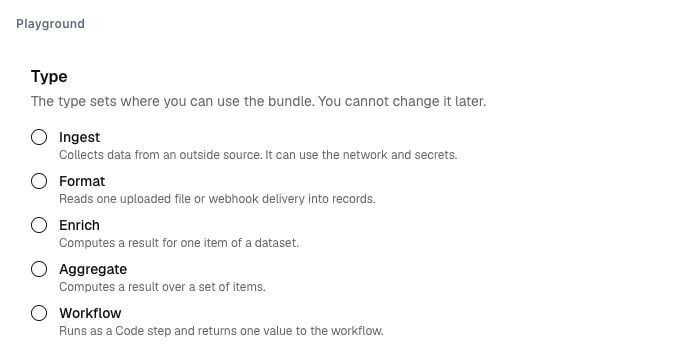 Open **Forge → Bundles** and choose **Agent tool**. Add `main.ts`:
```typescript theme={null}
import type { Tool } from "@ctx/script-sdk";
type Args = { values: number[] };
type Result = { count: number; total: number };
const sum: Tool = (ctx) => {
ctx.result({
count: ctx.args.values.length,
total: ctx.args.values.reduce((total, value) => total + value, 0),
});
};
export default sum;
```
Set runtime `2026.10` and entrypoint `main.ts`. No external package is required.
Use this Parameters schema:
```json theme={null}
{"type":"object","required":["values"],"additionalProperties":false,"properties":{"values":{"type":"array","maxItems":100,"items":{"type":"number"}}}}
```
Use this Result schema:
```json theme={null}
{"type":"object","required":["count","total"],"additionalProperties":false,"properties":{"count":{"type":"integer"},"total":{"type":"number"}}}
```
Set bounded wall time, CPU, memory, output and temporary storage. Declare no record outputs, network, secrets or checkpoint.
Publish the bundle and inspect its version and content digest. These identify the implementation that the tool runs.
A Tool bundle returns one result through `ctx.result`. A call returning no result fails.
Open **Forge → Tools** and create `custom_sum_values` for the agent surface.
Select the published bundle version. Confirm that the copied input/result schemas and implementation digest match that version. Retain the confined-runtime requirement.
Keep scope Private for your test, or use an authorised workspace scope. Deployment-wide authored tools are refused. Publish the descriptor.
Add the published tool to a permitted agent definition. Publish the definition for your test workspace and start an Explorer session.
Ask the agent to call `custom_sum_values` with values from your own small numeric check. Compare the returned total with a manual calculation.
Check an empty list and an invalid argument. Inspect the call's tool version and implementation binding. A missing confined runtime must leave the tool unavailable.
## Add data access deliberately
A more capable authored tool can call only the read-only built-in tools declared in its descriptor. Those reads use the turn sender's current authority.
It cannot read secrets, contact external hosts or gain authority through its bundle. Tool compute is attributed to the calling turn.
Change the bundle and descriptor through new publications. Missing or revoked pinned implementations block use. See [Publish, upgrade, and revoke reusable definitions](/vantage/create-reusable-methods/publish-upgrade-revoke).
This documentation is built and hosted on [Mintlify](https://mintlify.com), a developer documentation platform.
Open **Forge → Bundles** and choose **Agent tool**. Add `main.ts`:
```typescript theme={null}
import type { Tool } from "@ctx/script-sdk";
type Args = { values: number[] };
type Result = { count: number; total: number };
const sum: Tool = (ctx) => {
ctx.result({
count: ctx.args.values.length,
total: ctx.args.values.reduce((total, value) => total + value, 0),
});
};
export default sum;
```
Set runtime `2026.10` and entrypoint `main.ts`. No external package is required.
Use this Parameters schema:
```json theme={null}
{"type":"object","required":["values"],"additionalProperties":false,"properties":{"values":{"type":"array","maxItems":100,"items":{"type":"number"}}}}
```
Use this Result schema:
```json theme={null}
{"type":"object","required":["count","total"],"additionalProperties":false,"properties":{"count":{"type":"integer"},"total":{"type":"number"}}}
```
Set bounded wall time, CPU, memory, output and temporary storage. Declare no record outputs, network, secrets or checkpoint.
Publish the bundle and inspect its version and content digest. These identify the implementation that the tool runs.
A Tool bundle returns one result through `ctx.result`. A call returning no result fails.
Open **Forge → Tools** and create `custom_sum_values` for the agent surface.
Select the published bundle version. Confirm that the copied input/result schemas and implementation digest match that version. Retain the confined-runtime requirement.
Keep scope Private for your test, or use an authorised workspace scope. Deployment-wide authored tools are refused. Publish the descriptor.
Add the published tool to a permitted agent definition. Publish the definition for your test workspace and start an Explorer session.
Ask the agent to call `custom_sum_values` with values from your own small numeric check. Compare the returned total with a manual calculation.
Check an empty list and an invalid argument. Inspect the call's tool version and implementation binding. A missing confined runtime must leave the tool unavailable.
## Add data access deliberately
A more capable authored tool can call only the read-only built-in tools declared in its descriptor. Those reads use the turn sender's current authority.
It cannot read secrets, contact external hosts or gain authority through its bundle. Tool compute is attributed to the calling turn.
Change the bundle and descriptor through new publications. Missing or revoked pinned implementations block use. See [Publish, upgrade, and revoke reusable definitions](/vantage/create-reusable-methods/publish-upgrade-revoke).
This documentation is built and hosted on [Mintlify](https://mintlify.com), a developer documentation platform.